Drum Pad Machine - beat maker
- 4.3
- Rating
- 100.00M
- Installs
- Free
- Price
 Analysis by App-foxy
I first approached Drum Pad Machine - beat maker as a quick music toy, but it became more useful once I stopped treating it like a simple collection of drum sounds. It is a hands-on Music & Audio app from Easybrain that lets me tap pads, layer patterns, and experiment with the feeling of a DJ setup without needing an instrument, a studio, or previous production experience. I would not call it a replacement for full music software, but it does make beat-making approachable in a way that works especially well when several people are taking turns on the same phone or tablet.
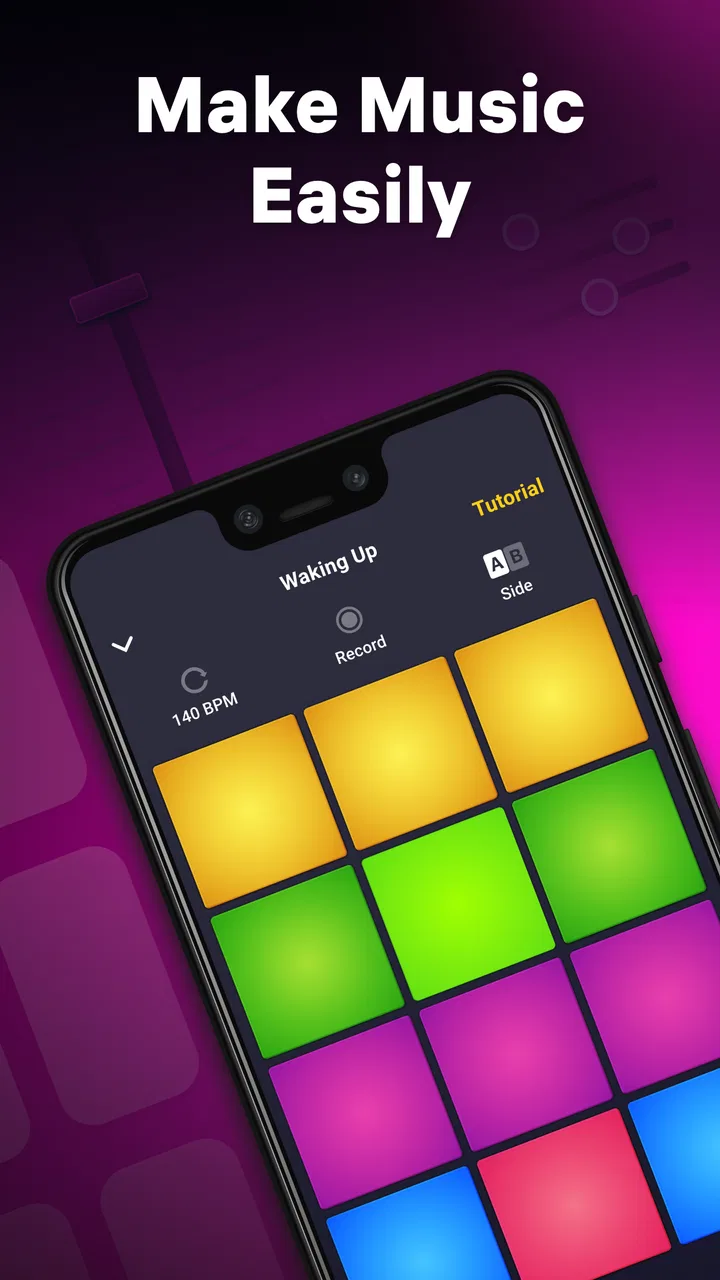
The appeal is immediate: open the app, touch the pads, hear a response, and adjust the rhythm by ear. That direct feedback makes it easy to understand what is happening without first learning a timeline, mixer, notation system, or complicated terminology. In my experience, the best results come from treating it as a sketchpad for rhythm rather than expecting a finished track on the first attempt. That distinction matters when deciding whether it belongs on your device.
How it works when a household shares one device
A realistic use case is a quiet evening when one person wants to make a beat and someone else is curious. One user can start a pattern, hand over the device, and let the next person add sounds or change the energy. The large, touch-focused layout makes this sort of informal handoff more natural than passing around a traditional music workstation with tiny controls. It also gives children and beginners a way to participate without needing to understand every control before making a sound.
You May Also Like

 AccuWeather: Weather Radar
AccuWeather Review: A Quick, Clear Forecast for Everyday Decisions
For everyday plans, the best forecast is the one you can understand quickly. AccuWeather makes rain timing, radar, and local conditions easy to act on, with a few trade-offs.

 Hill Climb Racing
Why Hill Climb Racing Still Turns Crashes Into One More Run
A tiny car, a bumpy hill and one more upgrade: Hill Climb Racing keeps resurfacing because its simple chaos makes every near-miss feel personal.

 AliExpress - Shopping App
AliExpress Makes Global Shopping Feel Personal, but Shoppers Bear the Risk
AliExpress turns a global marketplace into a pocket-sized discovery engine. Its reach is useful, its shopping loop compelling, and its trade-offs easy to miss.

 Lords Mobile: Kingdom Wars
Lords Mobile Is a Kingdom-Building Routine, Not a Quick Match
A case-by-case verdict on the building, battles, device demands, and social commitments that make Lords Mobile rewarding for some players and exhausting for others.

 PDF Scanner app - TapScanner
TapScanner Makes Paperwork Easier to Capture, Check, and Share
TapScanner makes scanning with a phone feel less like a rescue operation and more like a dependable step in getting work done. Its capture tools are useful, though not flawless.

 Block Blast!
 Shows How Much a Puzzle Game Can Leave Out
A quiet grid game shows why puzzle players increasingly value instant clarity, repeatable skill and low-pressure play—and where the genre still needs to catch up.
More From Our News Desk
View All News


I found that the strongest shared-device activity is not trying to produce a polished song together immediately. It is more like a musical conversation: one person establishes a pulse, another adds a contrasting hit, and a third decides whether the result feels too busy. That makes the app useful for short sessions, creative breaks, and simple rhythm games between friends. The experience is active rather than passive, so it can hold attention better than merely playing a playlist while people sit together.
There is one practical limitation to this style of use. Several hands reaching for the same screen can make timing messy, and people may disagree about which sounds belong in the pattern. I recommend agreeing on a short turn before starting. A useful routine is to let one person choose the basic groove, another add accents, and the original user make the final adjustment. This keeps the session collaborative instead of turning into random tapping.
The app is also a good fit for someone who wants to understand why a beat feels energetic or relaxed. Removing one layer can make a pattern clearer; adding a repeating accent can make it feel more urgent. Those small changes teach arrangement by listening. You do not need to call it a lesson, but the interaction encourages attention to timing, repetition, and contrast.
What to decide before handing over the phone
Shared use works best when the device owner decides what kind of session is appropriate first. If the goal is casual experimentation, everyone can simply explore. If the goal is to keep a promising beat intact, I would avoid handing the device over while someone is still changing the main pattern. The app encourages immediate action, which is fun, but that also means an accidental tap can alter the sound before another person understands the current arrangement.
I would also set a clear boundary around purchases before letting a child or guest use the app. It is free to install and use, but in-app items cost $5.49 each. That is not a reason to avoid it, yet it is a good reason for the device owner to handle any purchase decision personally. A shared screen is not the same thing as shared permission to spend money, and the app should be treated accordingly.
Another useful boundary is volume. Beat-making invites repeated tapping, and a pattern that sounds exciting for a few minutes may become tiring in a small room. Headphones can make solo experimentation more comfortable, while a speaker is better when everyone is deliberately listening together. I would not leave the sound running unattended around sleeping family members or people working nearby.
Because the app is designed for touch interaction, I would keep the device stable on a table during group use. Holding it in one hand while tapping with the other makes accidental touches more likely. A flat position also lets two people see the same pad layout and coordinate their choices. This is a small change, but it makes a noticeable difference when the app is being used as a shared activity rather than a private experiment.
Keeping a group session coordinated
The easiest way to coordinate is to separate listening from editing. Let the current pattern play long enough for everyone to hear its basic pulse, then make one change at a time. If several people tap different pads at once, it becomes difficult to tell which decision improved the beat and which one made it cluttered. I prefer a slower process: establish the main rhythm, add one memorable sound, and only then decide whether another layer is needed.
This approach also helps when users have different levels of confidence. A beginner can contribute a simple repeated sound, while someone more experienced can shape the overall feel. Nobody has to compete for the most impressive part. The app is at its best when the group treats each sound as part of an arrangement rather than as an isolated effect.
For a family or group, a short challenge can make the session more focused. One person might aim for a calm beat, another for something suitable for dancing, and another for a dramatic transition. These are not formal modes or built-in systems; they are ways I would organize use around the app’s touch-based tools. The benefit is that everyone has a role, even if nobody knows music theory.
There is also value in recording the general idea mentally before changing it. Since this is a fast, tactile environment, users can easily keep adjusting without noticing that the original version was stronger. I suggest pausing after a promising combination and asking whether the new layer improves the groove or merely makes it louder. That simple question prevents the common beginner mistake of confusing more sounds with better music.
Age, trust, and choosing the right user
The content rating is Everyone, and the basic activity is easy to understand: tap musical pads and listen to the result. That makes it approachable for children, teenagers, adults, and older relatives who may not be comfortable with traditional production software. Still, an Everyone rating does not remove the need for ordinary supervision on a shared device. The important issues are spending, volume, turn-taking, and whether the device owner is comfortable with someone changing an ongoing project.
I would be happy to introduce it to a child as a creative activity, especially when an adult is nearby at the beginning. The first session is a good moment to explain which parts are for experimenting and which actions should be left to the owner. The app can support independent play later, but trust should grow from observed use rather than being assumed simply because the age rating is broad.
For teenagers, the app can be a low-pressure way to explore beat-making without the embarrassment of showing unfinished work in a more advanced program. They can focus on rhythm and mood first. Adults may enjoy it as a short break from work or as a way to create a rough musical idea before moving to a more capable tool. In both cases, the app succeeds because it reduces the distance between an idea and an audible result.
It is less suitable for someone who wants detailed control over every note, serious multitrack editing, or a predictable professional workflow. If you already work comfortably with a full digital audio workstation, this may feel intentionally limited. You will likely get more precision from software built around timelines, instruments, automation, and detailed editing. The advantage here is speed and accessibility, not depth.
I also would not choose it as the only tool for a learner who wants to study melody, harmony, or formal composition. Its strongest language is rhythmic layering and performance-style interaction. It can encourage musical curiosity, but it does not replace an instrument, structured lessons, or a more complete production environment. That is an important distinction for parents deciding whether it is entertainment, education, or both.
What makes it different from ordinary music apps
Compared with a streaming service, this app asks the user to create rather than consume. Compared with a basic drum machine, its appeal is the immediacy of tapping several parts of a beat and hearing the combination develop in front of you. Compared with full production software, it removes much of the setup and technical overhead. I see it occupying the middle ground between a musical toy and a serious sketching tool.
That middle ground is valuable when the main obstacle is hesitation. A complex workstation can make a new user spend more time searching for instruments and controls than making music. Here, the first few actions feel understandable. The trade-off is that users who want exact editing may soon reach the limits of the simplified approach. I would start here for confidence and move elsewhere when control becomes more important than immediacy.
The developer is Easybrain, and the app has been available since Aug 31, 2014. Its current version is 2.29.0, with Android support beginning at version 7.0. Those details make it a practical option for people using an older compatible Android device, although the actual experience will still depend on the screen, speakers, and general condition of that device.
Its popularity is substantial: it has passed 100 million installs, with an average score of 4.3 from around one million ratings and about 58 thousand written reviews. I do not treat popularity as proof that every musician will enjoy it, but it does suggest that the basic idea has reached far beyond a small specialist audience. The broad appeal makes sense once you see how little preparation is needed to begin.
The app is free, which lowers the barrier for trying it during a family session or a short creative break. The presence of $5.49 in-app items means I would still check the purchase settings on a shared device before giving someone unrestricted access. I would not make a buying decision based on the free label alone; I would first see whether the included experience already satisfies the intended use.
Small techniques that improve the experience
My first practical tip is to begin with fewer sounds than you think you need. A simple pulse gives every later addition a clear job. If the pattern becomes crowded, remove the least distinctive layer instead of adding another sound to compensate. This is especially useful for children, because it turns experimentation into a listening exercise rather than a race to activate every pad.
My second tip is to use a call-and-response structure during group play. One person creates a short rhythmic idea, and another answers with a different accent or texture. This gives two users a clear relationship and prevents both from tapping continuously. It also makes the result easier to evaluate because the contrast is obvious.
A third useful habit is to change only one musical quality at a time. If the beat feels flat, try adding an accent; if it feels chaotic, remove a layer; if it feels too heavy, simplify the repeated hits. Making several changes at once may produce a surprising result, but it teaches you less about why the sound changed. Single-step adjustments are better when the app is being used as a learning tool.
For a shared phone, I would appoint one person as the session keeper. That person does not have to be the most musical user; the role is simply to protect the current idea and decide when a turn ends. This is a surprisingly effective way to reduce accidental changes. It also makes the activity more welcoming for someone who is nervous about touching the wrong control.
Finally, I would treat the app as a starting point for a creative prompt. Ask users to make something that sounds suitable for a morning routine, a game entrance, or a rainy afternoon. The prompt gives the tapping a purpose and encourages discussion about mood. Without that structure, a shared session can become noisy quickly, particularly when several people have different ideas about what sounds good.
Where the friction becomes noticeable
The same immediacy that makes the app friendly can make it feel shallow to experienced users. If you want to place every event precisely, build a long arrangement, or revise a single moment without disturbing the rest, you may prefer a dedicated production app. Drum Pad Machine - beat maker is more convincing as an interactive beat-making space than as a complete studio.
There is also a social limitation: collaborative use depends on people agreeing about the device and the direction of the music. The app itself cannot solve turn-taking or household boundaries. Parents and device owners need to establish those rules. That is not a flaw in the sound design, but it matters when the app is installed on a phone used by several people.
Beginners may also mistake constant activity for progress. Tapping quickly can feel exciting, but a beat usually becomes more enjoyable when there is space between the important sounds. I would encourage new users to listen after each change and resist the urge to fill every moment. The app makes this lesson accessible, but the user still has to apply it.
On the other hand, advanced users may appreciate it precisely because it avoids unnecessary setup. When I want a fast rhythmic idea rather than a finished production, a focused pad interface can be more inviting than opening a large workstation. The right choice depends on whether the next step is exploration or detailed construction.
My household verdict
I recommend this app for households that want a quick, approachable creative activity on a compatible Android device. It works particularly well when one person introduces the basics, everyone takes an agreed turn, and the group listens instead of simply competing to tap the most pads. The Everyone rating and free entry make it easy to try, while the touch-based design gives beginners an immediate sense of participation.
I would skip it if your main goal is professional recording, deep sound design, or precise arrangement. I would also avoid leaving purchase decisions vague on a shared device, since individual in-app items cost $5.49. The app is not a substitute for careful household boundaries, even though it is simple enough for broad age groups.
For me, its best role is a musical sandbox: quick to open, easy to share, and capable of turning a few spare minutes into a small collaborative beat. It teaches useful instincts about layering, space, and rhythm without demanding formal training. If you want instant musical participation rather than a full studio, this is where Drum Pad Machine - beat maker earns its place.
FAQs for Drum Pad Machine - beat maker
01What is Drum Pad Machine?
Drum Pad Machine is a mobile app designed for aspiring musicians and beatmakers, allowing users to create music using a variety of preloaded sounds and effects. It transforms your device into a portable music studio, making it easy to compose beats and tracks on the go.
02Is Drum Pad Machine suitable for beginners?
Yes, Drum Pad Machine is user-friendly and suitable for beginners. It features a simple interface with tutorials and guides to help new users learn the basics of beat making. The app also offers a wide range of sound packs to explore different music genres.
03Does Drum Pad Machine require an internet connection to work?
Drum Pad Machine can be used offline, which is great for users who want to create music without an internet connection. However, an internet connection is required to download additional sound packs and access certain features within the app.
04Are there in-app purchases in Drum Pad Machine?
Yes, Drum Pad Machine offers in-app purchases. While the app is free to download, users can buy premium sound packs and remove ads through in-app purchases. This allows for a more extensive selection of sounds and an uninterrupted music-making experience.
05What devices are compatible with Drum Pad Machine?
Drum Pad Machine is available for both Android and iOS devices. It is compatible with most smartphones and tablets, but it's always a good idea to check the app store for specific device requirements and ensure your device is running a supported operating system version.
Pros
- Intuitive interface for beginners.
- Wide variety of sound packs.
- Responsive touch controls.
- Regular updates with new features.
- Supports recording and sharing.
Cons
- Ads interrupt the creative flow.
- Limited free sound packs.
- Requires internet for some features.
- Occasional lag on older devices.
- Subscription model can be costly.

Drum Pad Machine - beat maker
Gallery